
If you already use Claude Code or Codex, your work is already on your computer: the repositories you've been working in, and the accounts and skills you've set up. A new install of Unstoppable Code shouldn't start you in an empty app. From version 1.12.0, it doesn't.
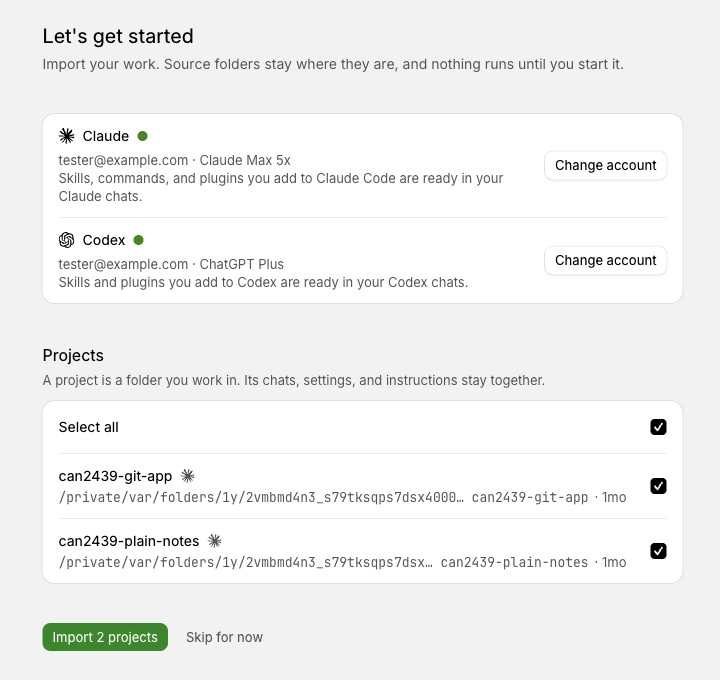
A new install now opens on a page called Let's get started. I built it to replace the old onboarding wizard and tour with what you need before a first task: your accounts, your projects, and a way into a chat.
What the page shows
- Your Claude and Codex accounts. Each row shows the signed-in email and plan, or a Connect button. The line under it confirms that what you've added to Claude Code or Codex, such as skills and plugins, is ready in those chats. It's read from your existing setup, not copied.
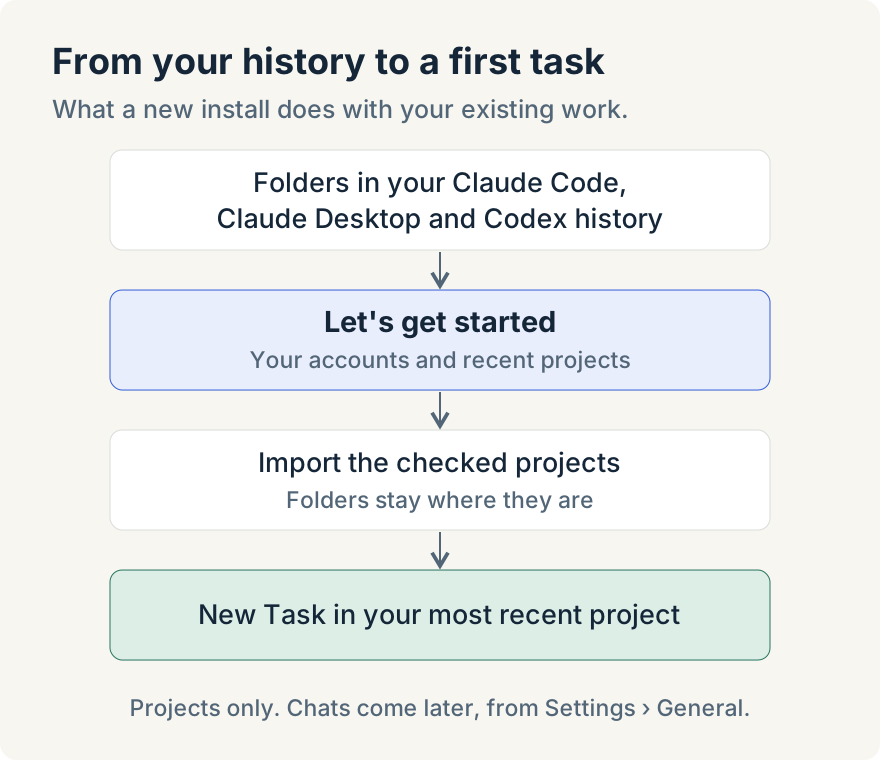
- The projects on this computer. The app looks through your Claude Code, Claude Desktop and Codex history for the folders you've worked in. Each row shows the path and when you last used it, dated from the last message in that project rather than when a file last changed. Projects used in the last 90 days start checked; older ones sit behind Show N older projects.
What importing does
Select Import N projects and the checked folders become projects. A folder with a Git repository becomes a Code project, and any other folder becomes a Cowork project. As the page says: "Source folders stay where they are, and nothing runs until you start it." Nothing is moved or copied, and no setup script runs.
You land on Home with New Task pointed at the project you used most recently, so the next step is describing the first task. Skip for now takes you to Home without importing. Either way, the page doesn't come back.
Bringing chats over later
This first page imports projects, not chats. Chats from a Code project open in a new worktree based on your remote's default branch, so that's a choice I'd rather you make on purpose. When you want them, open Settings › General, find Import projects and select Import from Claude and Codex, then choose the chats to bring for each project. Commit and push first: uncommitted or unpushed changes stay in the original folder. Ryan Le built that import; the first page builds on it.
Limits
- New installs only. If you already have projects, use Settings › General instead.
- Desktop only. The web app can't read the Claude and Codex history on your computer.
- Local history only. Claude.ai Projects in the cloud have no local folder, so they aren't listed.
The Let's get started page is in the Unstoppable Code desktop app from version 1.12.0. Download the app; if you've used Claude Code or Codex on that computer, your recent projects are on the first page.