
On a busy day I have a dozen or more tasks in flight, each in its own worktree. I used to click between them to see which were done, which were stuck, and which needed me. Now I don't. I talk to one chat, and a few more chats run in the background to keep it supplied with work.
This post explains the idea first, then shows my actual setup.
The idea: a chat that wakes itself up
A chat automation is a regular chat with one job and a schedule. Each time it wakes up, it does one round of its job and then schedules its next wake-up in the same chat. Nothing else is needed: no server, no separate tool.
Keeping it in one chat has three benefits:
- All of its history is in one place. You can scroll back and see what it did.
- You steer it in plain words. "Skip that ticket" or "check this PR first" works like any other chat.
- You can pin it. It sits in the sidebar, and you can see at a glance if it's busy.
Each automation follows a short markdown runbook that it re-reads every time it wakes up. To change how it behaves, you edit the file.
Prefer one assistant to many chats? Unstoppable Code also has an Advisor window, an assistant that works across all your projects and can manage worktrees and chats for you. It's a good alternative. This post covers the simpler option: plain chats that run on a schedule.
My setup: five pinned chats
| Chat | Wakes up | Its job |
|---|---|---|
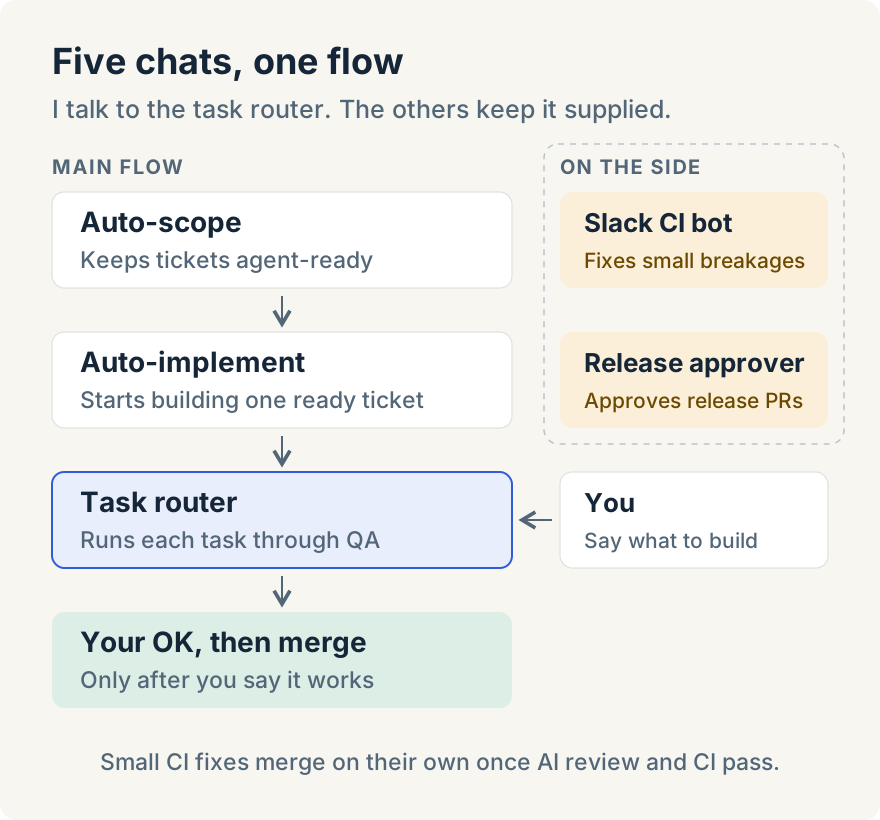
| 🐙 Task router | every 30 min | Runs every task in flight, through QA and merge |
| 🤖 Auto-scope | every hour | Keeps a pile of tickets ready for an agent to build |
| 🤖 Auto-implement | every hour | Takes one ready ticket and starts building it |
| 🤖 Slack CI bot | twice an hour | Fixes small breakages that teammates tag me on |
| 🤖 Release approver | every 15 min | Approves release PRs when I'm asked to |
The task router is the only one I talk to every day. The other four keep it supplied with work and fix things that break.
The task router
The router doesn't write code. It hands each task to its own worktree and pipeline, keeps track of them, and tells me when one needs me. I only do two things: say what to build, and check what got built.
- I give it a task, or a helper does. I can paste a ticket or write a sentence. Auto-implement also starts tasks on its own (more on that below).
- Each task gets its own worktree and pipeline. An implementation pipeline plans the change, builds it, reviews it, and opens a PR.
- The pipeline records the change. For UI work it records a short video of the journey, edge paths included (Deny, Cancel, Retry), and uploads it with stills.
- The router checks the result before I see it. It opens the stills itself and looks for overlap, clipping and stuck states. If something looks wrong, it sends the work back without asking me.
- I get one message per PR: the PR link, the recording link, and 3–5 things to watch for.
- I watch and reply. "Looks good" means it merges once CI and the review gate pass. "The button wraps in dark mode" goes straight back to that worktree as a fix request.
- When I want to click through it myself, I ask the router to set up a local QA build and it tells me when that's ready.
Nothing merges without my OK.
Every 30 minutes the router also checks the whole board. It finds worktrees that died when the app restarted, pipelines paused on a rate limit, PRs that dropped out of the merge queue, and branches that fell behind. It fixes what it can and only pings me for QA or real decisions. When a PR merges, it archives the worktree and stops any leftover dev servers, so my laptop stays fast.
The helpers
Auto-scope makes tickets agent-ready. An agent can only build a ticket that has a clear goal, a clear "done", and no open questions. Auto-scope keeps at least three of those queued. Each hour it scores my tickets 0–10 for how well an agent could build them with no help. Then it fills the gaps it can close itself, such as finding the right files or writing down how to check the result.
When a gap needs a human, it asks me once, in a fixed format:
🚨 NEEDS YOU — "Show item status in the plugin list" (score 6 → could reach 9)
- Should disabled items stay in the list? — proposed: yes, greyed out
Reply "1 yes" or "skip".
I answer in one line. It writes my answer up as a comment on the ticket and scores it again. If the decision belongs to someone else, it drafts a question for that person instead of asking me to guess.
Auto-implement starts the work. Each hour it looks for a ticket that is ready, assigned to me and not blocked. It claims the ticket, starts a fresh worktree and runs the implementation pipeline. From there the router takes over. It stops when the machine is busy. It never takes someone else's ticket.
The Slack CI bot fixes small breakages. Our UI test suite runs on the main branch, and a teammate's bot posts which PR broke which test. When a post tags me, my bot reads the thread. If it's a small breakage, such as a stale test or a clear regression, it reacts with 🤖, replies "on it", and starts one fix chat per problem.
One example from a Saturday: a triage post listed 13 failing tests across four of my PRs. The bot replied in the thread and started four fix chats. All four fixes were merged within about three and a half hours, and I didn't open a single worktree. It left two items for me, because one needed a design call and one a product decision.
Small fixes merge on their own once AI review and CI pass. Anything that needs a product or design call goes back to me.
The release approver handles the routine sign-off. When the team cuts a release, the release PR needs a review from everyone whose changes are in it. When someone tags me with that request, this bot checks the PR is really a release cut and approves it. Then it adds an approval reaction to the Slack message so people can see it's done. It never approves feature PRs, and it never posts text in Slack. It also skips the PR if someone has asked to hold the release.
What makes them reliable
- A state file and a work log. Chat history gets compacted. Files don't. Each chat reads its state first, writes it last, and adds one line to its work log when it does something. When I ask "what happened with that PR?", it reads the log.
- Hard limits in writing. Each runbook lists what the chat may change and what it must never do. For example: never force-push, never merge a UI change I haven't seen, never reassign someone else's ticket.
- Re-arm first. A chat's first step is to schedule its next wake-up. We learned this the hard way: once a wake-up fired during an app restart, and the scoping loop sat dead for a day and a half.
- Lessons become rules. When something gets stuck in a new way, the fix goes into the runbook as a rule. The router's list of lessons has grown past 20. Once the app's scheduler stalled after a restart, and timed jobs stopped starting. The Slack bot now checks for overdue jobs and starts them itself.
What changed for me
I don't switch between worktrees anymore. My day is a list of recordings and a couple of questions. I watch a recording, approve it or ask for changes, and open the next one. I still answer what Auto-scope can't answer and make the product and design calls the bots hand back. The rest runs while I'm in meetings or asleep.
Build your own
Start with one chat, not five. The task router gives the most back. Then add whichever loop you keep doing by hand. For each one:
- Start a new chat, name it, and pin it.
- Write its runbook: its goal, its steps, its hard limits, where its state lives.
- End the runbook with "schedule your next wake-up in this chat".
- Run it once while you watch, then let it loop.
- Each time it gets stuck, add a rule.
For a task router, four rules are enough to start:
- Start every task in its own worktree, run through your implementation pipeline.
- Send me a recording and a short "watch for" list for every PR.
- Never merge until I say it works.
- Every 30 minutes, check on everything in flight and fix what's stuck.
Mine is a few weeks old and still learning.