
A merge queue keeps the main branch green, but it moves the waiting to the end of the job. The pull request is approved and the code is done, and I still have to watch it. The queue reruns checks against everything ahead of it. If something that merged first breaks my change, or a check fails in the merge group, GitHub removes it from the queue, and I find out whenever I next look.
That last stretch is what I wanted an agent to take over. In the desktop app, I built the Merge chat that does it. Mike Sotnichek built the pull request watcher and the queue phases it sits alongside. Here is how I use them.
Clicking Merge on a repository with a merge queue
When a repository's base branch requires a merge queue, the Merge button on the pull request starts a chat instead of merging directly. The tooltip says what it will do: "Start a chat that adds this pull request to the merge queue and watches it until it merges."
The chat is titled "Merge" plus the repository name and "through the merge queue", and it runs a merge skill that ships with the app. It uses my default model and approval mode, so it works the way my other chats do. If you haven't used skills before, what an agent skill is covers the idea; this one is a written procedure for getting a pull request through the queue.
The chat adds the pull request to the queue, using auto-merge where the repository allows it, then checks its status every minute while it runs. While that happens, the pull request row shows where it is: "In merge queue" with its position, and a phase such as "Waiting in queue", "Awaiting queue checks", "Queue checks passed" or "Locked for merge". If GitHub can't merge it from the queue, the row shows "Can't merge from queue" in a warning color.
Nick Shatilo described saving a "babysit this PR" routine in How I use memory with agents, with a note that merging needs separate authorization. Here, clicking Merge is that authorization. The agent doesn't decide on its own that a pull request should merge.
When the queue removes the pull request
This is the part I care most about. When the pull request leaves the queue without merging, the agent finds out why before doing anything else.
For failed checks, it finds the merge-group run and sorts the failure into one of a few kinds:
- The base branch moved. Something that merged ahead conflicts with this change. The agent reproduces the failure locally, fixes it, pushes a new commit and turns auto-merge back on so GitHub queues it again.
- The base branch is already broken. The same check fails without this change. That isn't something this pull request should fix, so the agent stops and reports it.
- A flaky check. It queues the pull request once more. If it fails again, it stops.
For a merge conflict, it waits for the conflicting pull request to land, resolves the conflict in a new commit and queues it again.
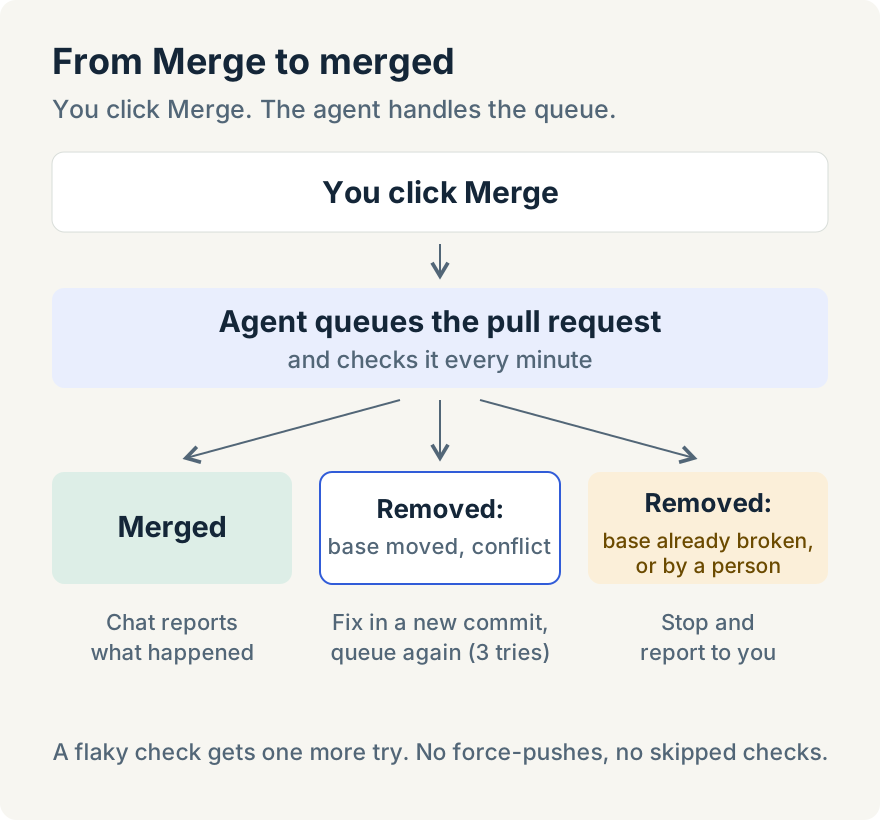
By default it tries at most three fix cycles. When it finishes, the chat ends with a summary: whether the pull request merged, each time the queue removed it, and what it changed in response.
What the agent won't do
The skill has its limits written in, because a merge agent that "gets to green" by any means is worse than no agent:
- It never force-pushes. Fixes land as new commits I can review.
- It never uses admin rights to bypass the queue, and never removes someone else's pull request from it.
- It never weakens, skips or deletes a check to make it pass.
- It never treats removal from the queue as success.
- If a person removed the pull request from the queue, it stops and reports instead of queuing it again.
- It asks before fixes that touch database schemas or migrations, dependencies, public interfaces or authentication, and before deleting or skipping a test.
It also works with my GitHub access, not more. If it can't push, or the pull request is missing an approval, it stops and says so.
Asking to be told when a pull request merges
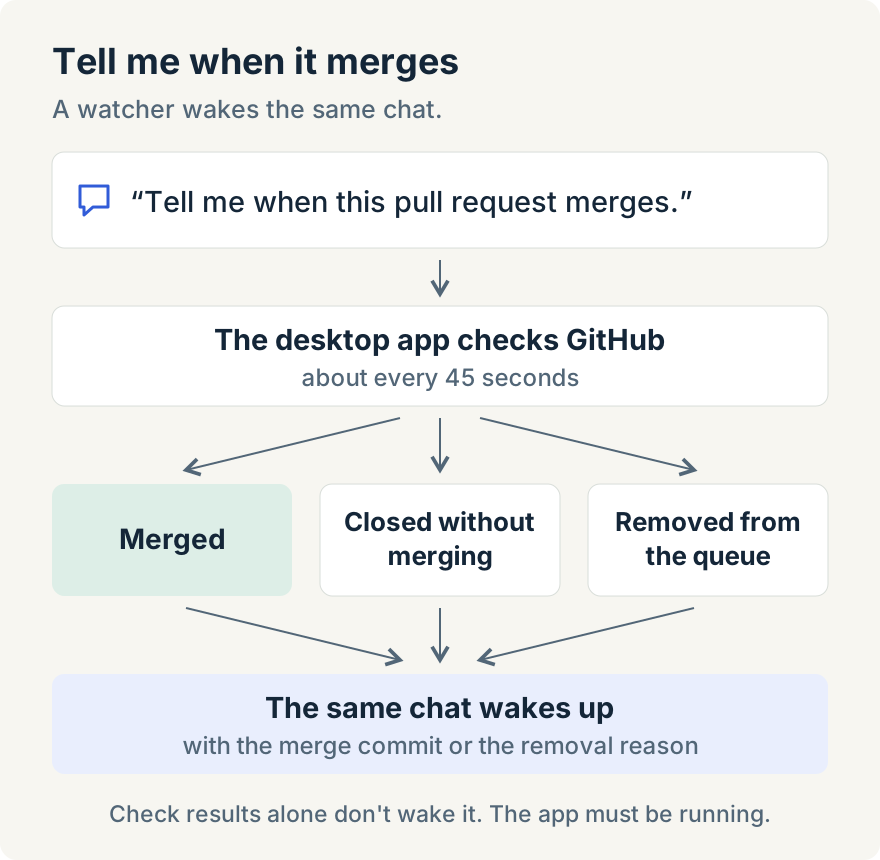
Sometimes I don't want an agent to merge anything. I just want to know when a pull request lands so I can do the next thing. For that I ask in the chat: "tell me when this pull request merges," with the link.
The agent sets up a watcher on it. The same chat wakes up when the pull request merges, closes without merging, or is removed from the merge queue, with GitHub's reason when it can be confirmed. The message includes the merge commit or the removal reason, so the agent can carry on: start the follow-up change, update a ticket, or tell me what broke.
One watcher can cover up to 20 pull requests. It also works in Cowork chats on Claude, Codex, Cursor and Copilot, so I can follow pull requests across several repositories from one place. If the app restarts, the watcher picks up where it left off.
It doesn't wake for check results; there's a separate watcher for workflow runs. I wrote about watchers that report back when a pipeline finishes in the parallel agents guide; this is the same idea applied to pull requests.
Where it stops
- The desktop app has to be running. It checks GitHub from the desktop about every 45 seconds rather than through webhooks. If the app is closed, GitHub's own auto-merge keeps going, but the agent can't react to a removal.
- GitHub.com only. GitHub Enterprise Server isn't supported.
- Automatic routing needs a merge queue. On a repository without one, Merge merges directly as it did before.
- It doesn't fix everything. Flaky checks get one more try, a broken base branch stops it, and after three fix cycles it hands back to me.
- The merge skill needs bash and jq on the machine running the desktop app.
- Desktop only. The web and mobile apps don't start these chats. On mobile, Remote Control reports that a chat was opened on the desktop.
None of this replaces review. The agent's fixes are new commits on the pull request, and I still read them. If you rely on checks to catch problems, it's worth having good ones first; see setting up quality gates for AI-generated code.
The point is the end of the day. I can click Merge on the last pull request, and as long as the desktop app stays running, a removal from the queue gets investigated without me. Pull request watching and the Merge chat are in the desktop app from version 1.9.0. Download the app to try them.