If the articles here do not solve your problem, get in touch. The fastest route depends on what you need.
Send feedback from the app
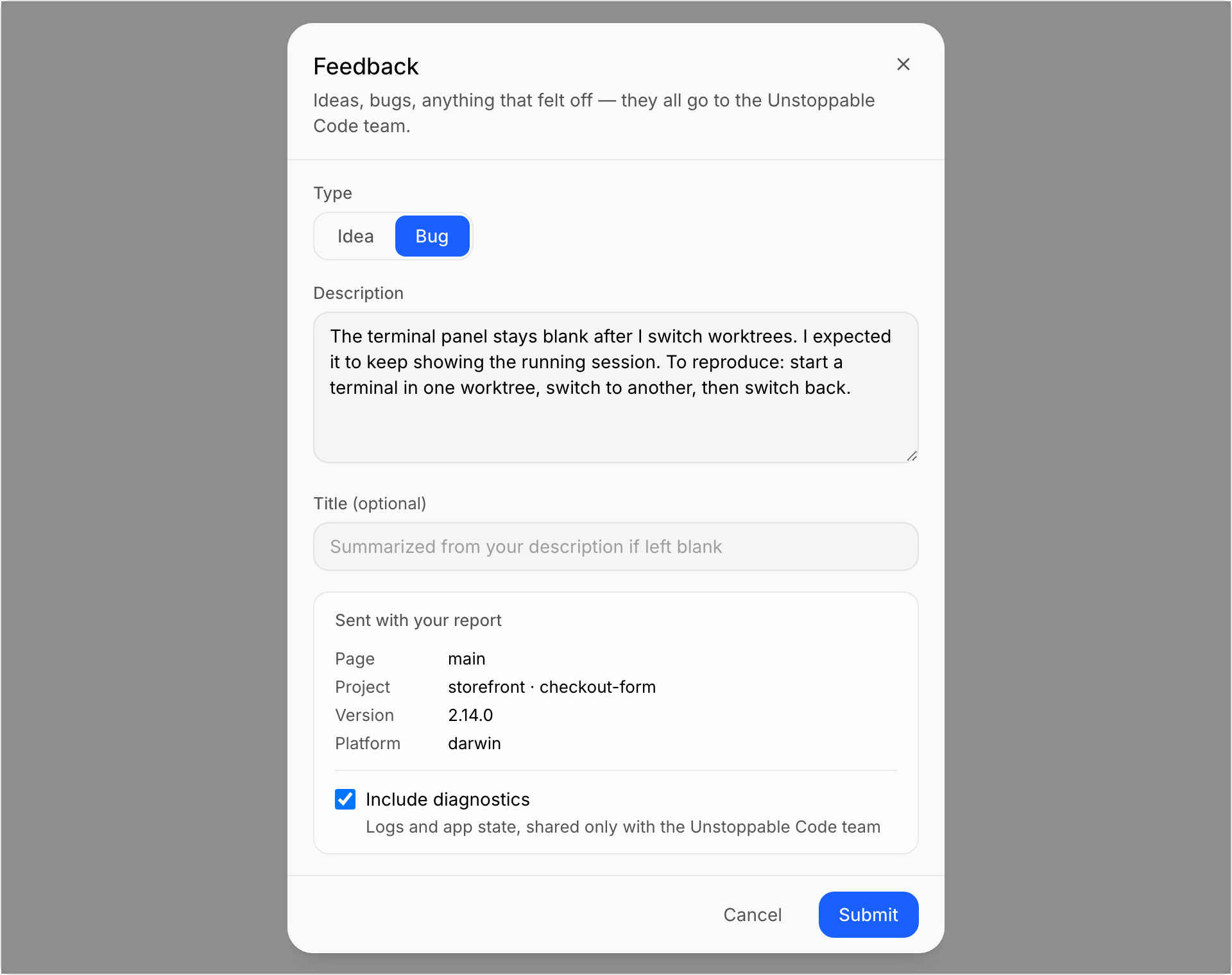
In the desktop app, open the account menu in the sidebar and select Feedback.
- Under Type, choose Idea or Bug.
- Describe what happened in Description.
- For a bug, you can turn on Include diagnostics to help the team see what went wrong. The dialog lists what is sent with your report.
- Select Submit.
Email us
Write to support@unstoppable.ai. Include:
- What you were trying to do, and what happened instead.
- Your operating system and the app version. You can find the version under Settings, General, in the Updates section.
- The email address on your account, if the problem is about signing in.
Never send passwords, authentication codes, or backup codes.
Report a bug or suggest an idea on the web
- Report a bug opens a support ticket.
- Feedback opens our feedback site.
Both links are also in the footer of this site.
Know who to ask
- Account access. If you cannot sign in, or your early access request is pending, see Sign in to your account first, then email us.
- Claude or Codex subscriptions. Your provider manages its own plans, payments, and usage limits. Contact the provider about those.
- AI credits. These belong to your Unstoppable Code account, so we can help. See AI credits and usage limits. Plans are on the pricing page.
Before you write
Many problems are fixed by the latest version. See Update the app. You can also get the latest build from the download page.